MASON EAC
Private cheat with EAC and BattlEye bypass for all game modes. AIM, ESP, radar, Streamproof — complete set for victory.
MASON EAC War Thunder cheat is a private build with an Easy Anti-Cheat and BattlEye bypass, declared for all game modes. It combines an aimbot with adjustable smoothing, ESP for ground and air vehicles, a radar, an enemy reload indicator and markers for missiles and bombs. Streamproof keeps the overlay off your recordings and screenshots. Plans start at 399 ₽ for one day.
You want this version if you spend most of your time in Realistic and Simulator battles and prefer one program for every vehicle class. Among the War Thunder cheats in our catalog, MASON EAC differs from the cheaper MASON ARCADE by its anti-cheat support and Streamproof. It differs from ESP-only builds by a full aimbot with a prediction marker.
Automatic aiming system
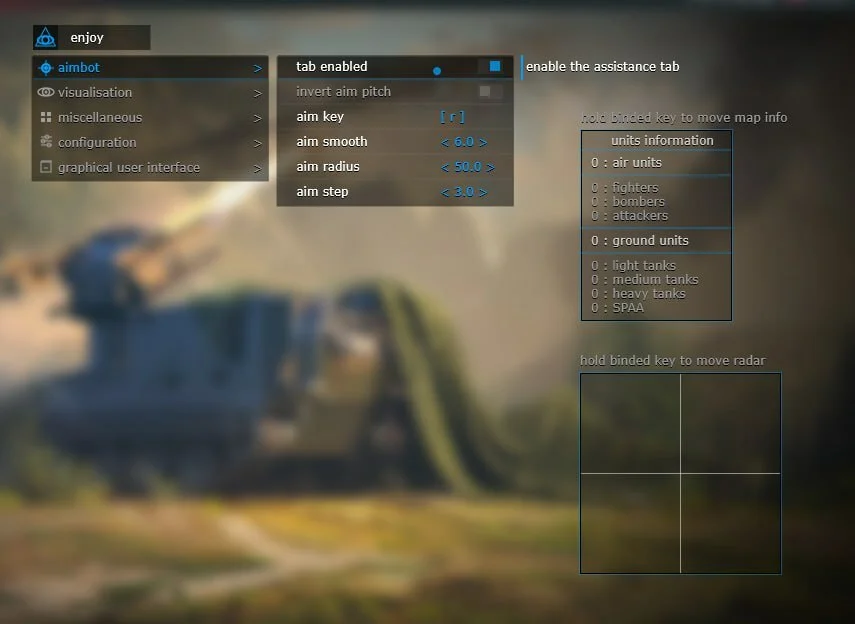
Enable aimbot
Set aimbot activation key
Set aimbot aiming speed
Set aimbot working radius
Aimbot shake adjustment
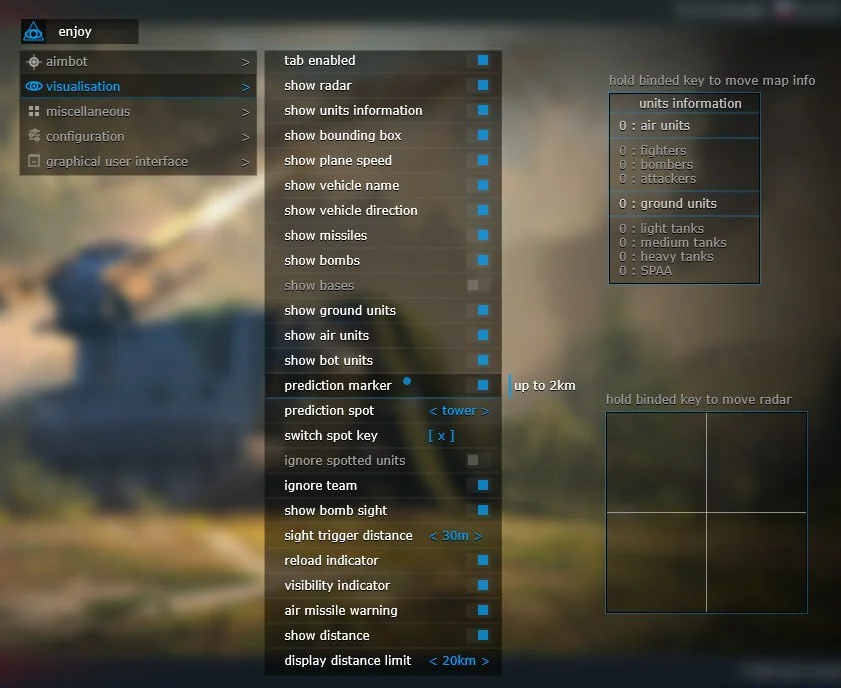
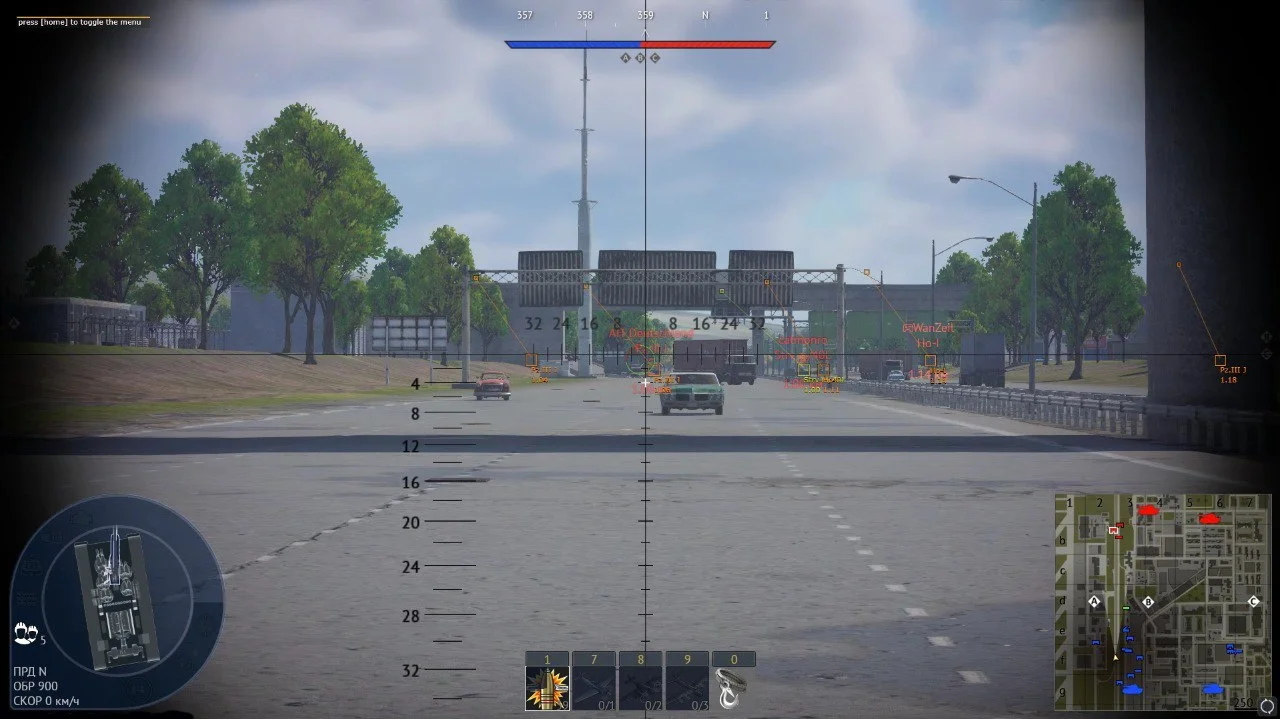
Visual information about enemies (works when spotted)
Enable ESP
Display radar
Display unit information
Display last position of vehicles outside spot
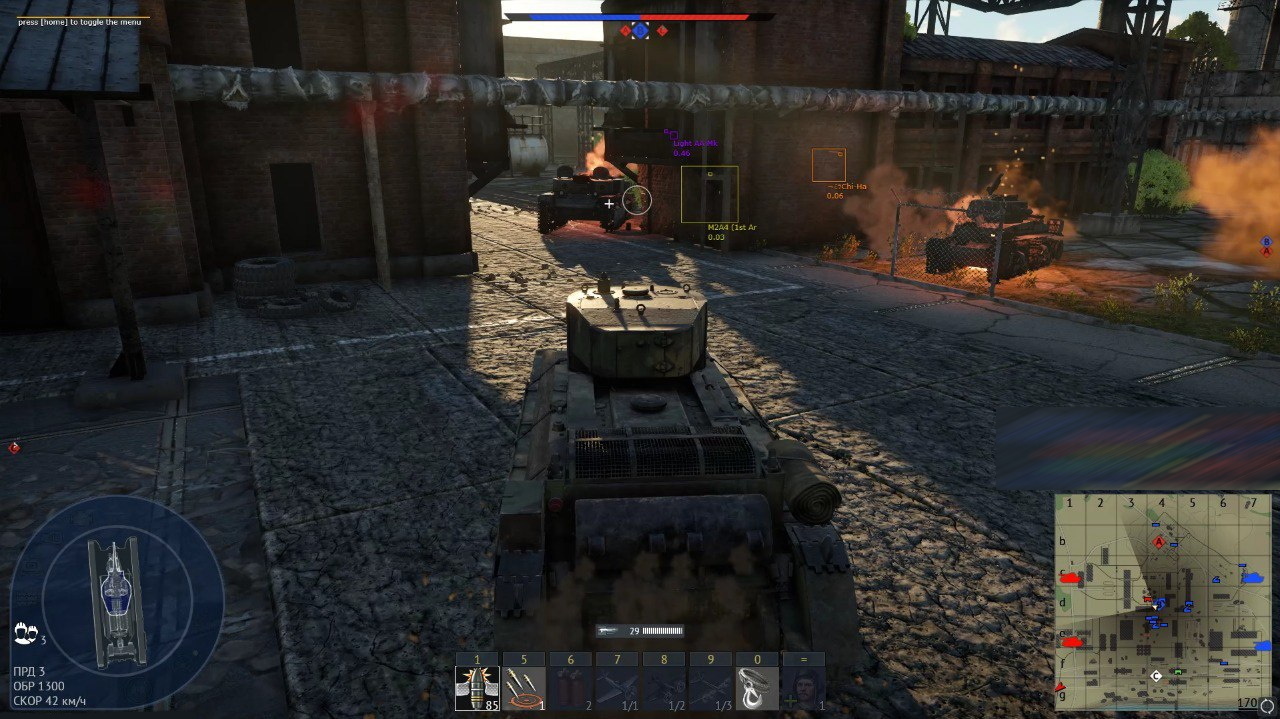
Display box around enemy
Display aircraft speed
Display vehicle name
Display vehicle movement direction
Display missiles
Display bombs
Display enemy bases and airfields
Display ground vehicles
Display air units
Display bots
Display player nicknames
Enable prediction point
Select prediction point (turret, hull)
Ignore detected players
Ignore team
Display bomb sight
Display enemy reload status
Target visibility icon
Missile warning
Display distance to enemy
Additional features
Rocket attack indicator
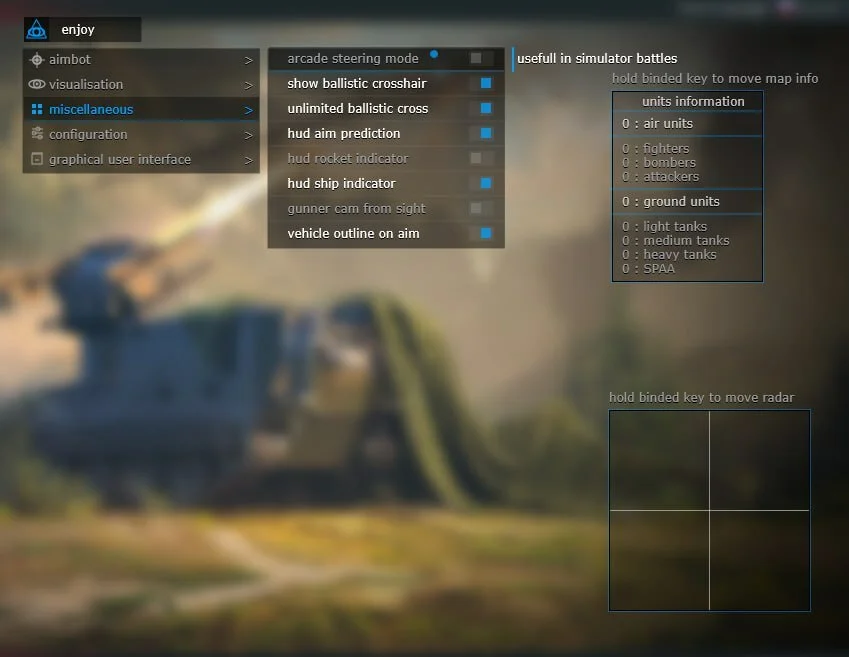
Arcade control in simulator mode
Crosshair showing where shell will land (tanks)
Remove crosshair range limit
Game engine prediction
Ship indicator
Hide gunner camera
Vehicle outline in crosshair
Zoom limit adjustment
Third person in simulator battles
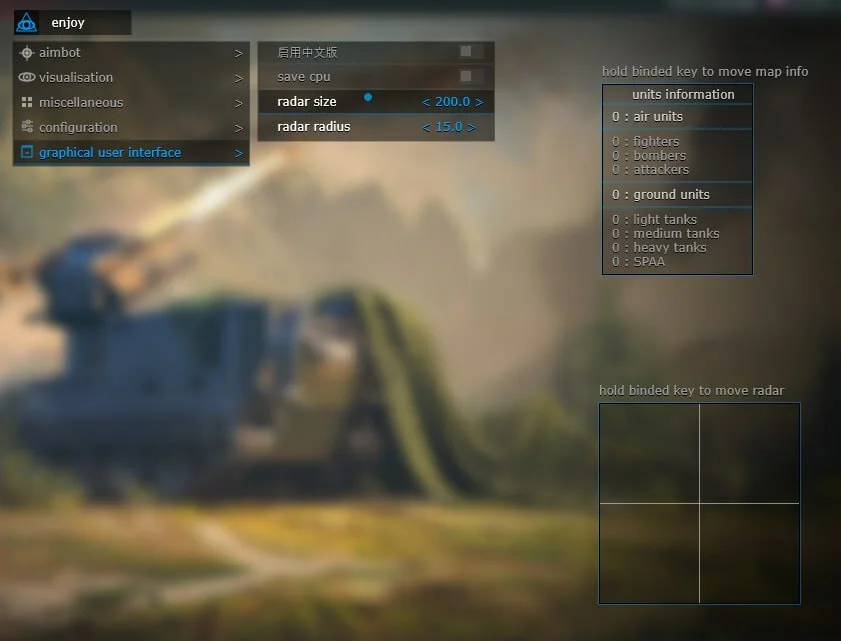
Configuration and interface
CPU resource saving
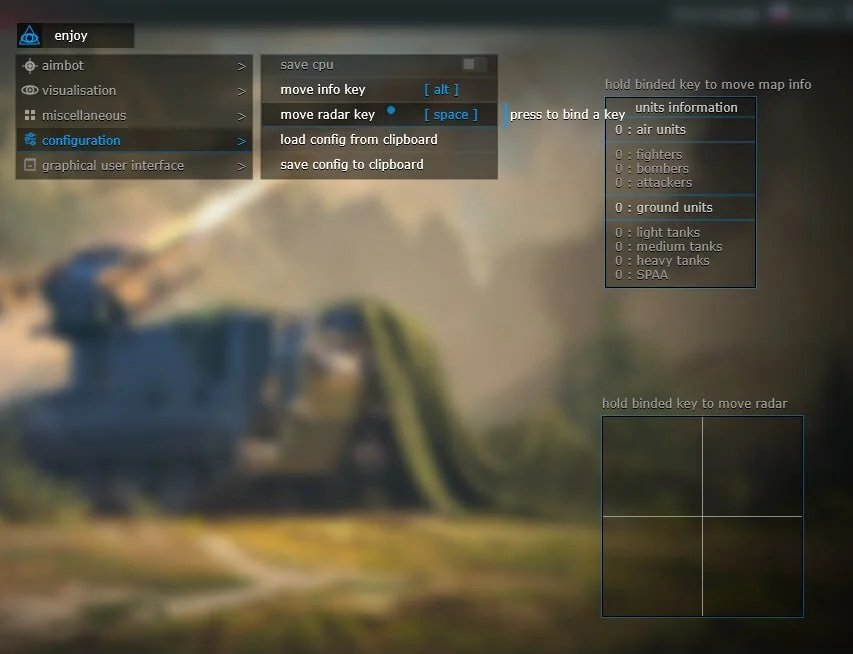
Info window move key
Radar move key
Load and save settings
Set radar size
Set radar radius
Menu language selection
What the MASON EAC War Thunder cheat can do
The aimbot runs on a key you assign and pulls the crosshair toward the target at the speed you set. Smoothing makes the correction gradual, the radius limits the capture zone around your crosshair, and the step setting removes jitter. On a spectator's screen the aim looks like a steady hand rather than a snap.
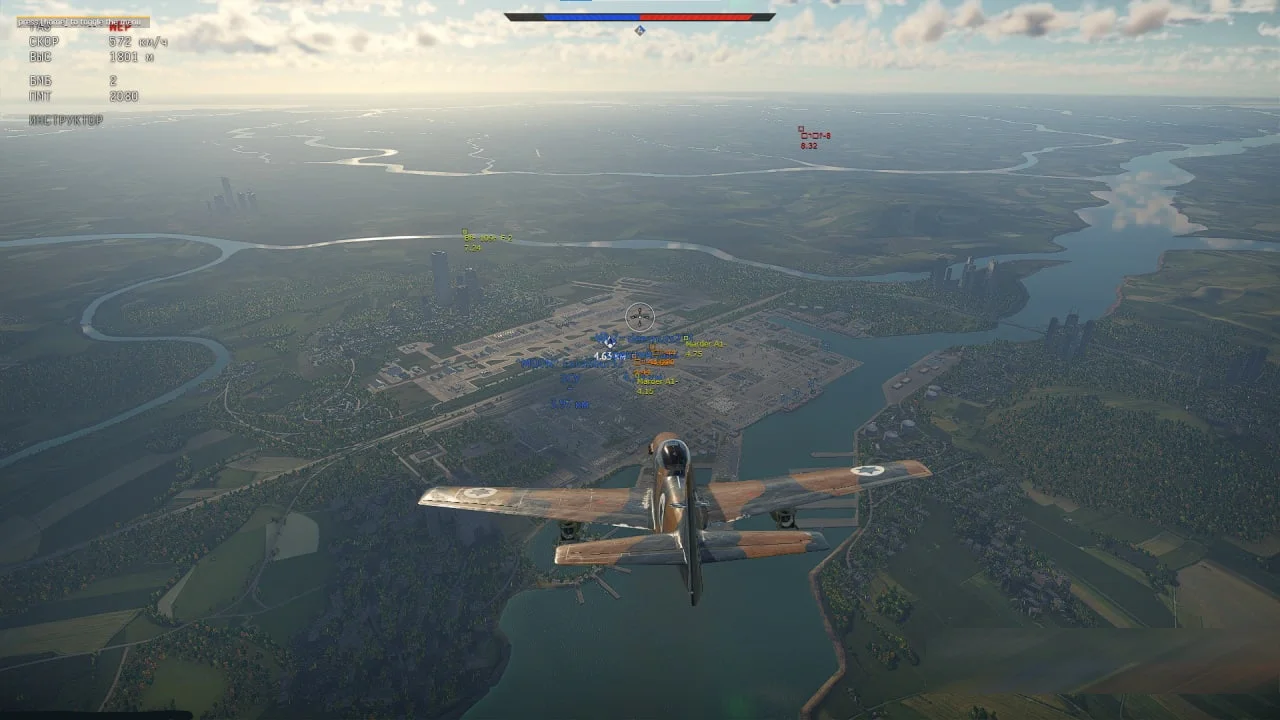
ESP works on spotted vehicles and draws a bounding box, the vehicle name, distance, movement direction and aircraft speed. Dormant units keep the last known position of a vehicle that left the spot, so you know where it went. A visibility icon and a reload indicator tell you whether the target can see you and whether its gun is loaded.
The prediction marker can be pinned to the turret or the hull, which lets you fire on the move without doing the lead in your head. The MISC block adds a ballistic crosshair for tanks with the range limit removed, a bomb sight, a rocket attack indicator, an air missile warning and a ship indicator. For Simulator battles you get a third-person view and arcade steering.
- Aimbot with activation key, smoothing, capture radius and jitter control
- ESP for ground vehicles, aircraft and bots, with player names, vehicle names and distance
- Radar with adjustable size and range, plus enemy bases and airfields
- Prediction marker on turret or hull and engine-based HUD aim prediction
- Enemy reload indicator and target visibility icon
- Missile and bomb markers, air missile warning, ship indicator
- Ballistic crosshair for tanks without a range limit, bomb sight
Game modes, vehicles and anti-cheat
MASON EAC is declared for all War Thunder game modes and works with both anti-cheats at once: Easy Anti-Cheat and BattlEye. You are not limited to Arcade, so Realistic and Simulator battles get the same feature set as low-tier matches.
ESP covers ground vehicles, aircraft and bots, and marks enemy bases and airfields. Ships get a separate HUD indicator. For aircraft the overlay shows speed and a missile warning, for tanks a ballistic crosshair and the enemy reload state. Separate toggles ignore your team and already spotted units so the screen stays readable.
Any 64-bit client works: Game Launcher or Steam. Run the game in Windowed or Fullscreen Windowed mode. Exclusive fullscreen is not on the supported list.
How to buy MASON EAC and launch it
Three plans are available: 1 day for 399 ₽, 7 days for 1499 ₽ and 30 days for 2999 ₽. Payment goes through oplata.info (Digiseller), and after it you receive a key and a loader link. There are no refunds once the key is issued, so check the system requirements before you buy MASON EAC.
You need Windows 10 or 11 x64, builds 2004 through 25H2, a UEFI boot and a GPT system disk. Virtualization (VT-x or VT-d) and Hyper-V must be enabled, and Secure Boot must be off. Any AMD or Intel processor is fine.
- Pick a plan on this page and pay through oplata.info
- Save the key and download the loader from the link you receive
- Confirm UEFI boot and virtualization are on in the BIOS and Secure Boot is off
- Check that Hyper-V is enabled and the system disk uses GPT
- Run the loader before WarThunder starts, enter the key and wait for it to load
- Start the game in Windowed or Fullscreen Windowed mode and open the menu
Who it suits and what to compare it with
MASON EAC is for players who live in Realistic battles and at high ranks, where the arcade version does not work. If you only play Arcade up to BR 10, MASON ARCADE is the cheaper pick: the same features without the EAC and BattlEye bypass and without Streamproof, at 149 ₽ per day.
If you want a built-in spoofer or a menu in more than one language, look at SMG. It costs 400 ₽ per day and also carries Streamproof, but EAC and BattlEye are not named in its description.
If you shoot on your own and only want to see the enemy, an ESP-only War Thunder hack such as MIRA LITE or MH LITE costs 250 ₽ per day. For a USD option with 3D boxes and a reload timer there is Fecurity at 6 $ per day.
Safety and Streamproof
Any software for this game carries a ban risk, and MASON EAC is no exception. What reduces the risk here is stated in the product facts: the Easy Anti-Cheat and BattlEye bypass, and Streamproof that hides the overlay from screenshots and recordings. Nobody quotes undetected percentages, and we do not invent them.
The rest depends on you. Aim smoothing, a small capture radius and a minimal ESP layout make your play look like a strong player's. Do not fire at vehicles you could not have seen without the program.
Configuration
All settings are stored in a config that you load and save from the menu. The radar and the info window move around the screen with assigned keys, so they never cover your sight or the in-game map. Radar size and range are set separately.
The menu language is chosen in the CONFIG block, and the Save cpu switch lowers the processor load on older builds. The zoom FOV limit and the gunner camera toggle are there too.
FAQ
What is MASON EAC for War Thunder
It is a private War Thunder cheat with an Easy Anti-Cheat and BattlEye bypass for all game modes. The set includes an aimbot with smoothing, ESP with a prediction marker, radar, an enemy reload indicator, missile and bomb markers and Streamproof. It is sold by subscription for 1, 7 or 30 days.
How much does MASON EAC cost
One day costs 399 ₽, seven days 1499 ₽ and thirty days 2999 ₽. You pay through oplata.info and get a key with a loader link right after the payment. No refunds are issued once the key is sent.
Does MASON EAC work in RB and SB
Yes. The developer declares support for all game modes, so Realistic and Simulator battles are included. For Simulator battles there is also a third-person view and arcade steering.
Can I download MASON EAC for free
No, access is subscription only. Private War Thunder cheats are never free: public builds get detected quickly, and keys and updates go only to paying users. Ask support in the Telegram bot @procheatsupport_bot whether a test key is available.
Does MASON EAC support EAC and BattlEye
Yes. Both Easy Anti-Cheat and BattlEye are listed in the technical requirements, which is the main difference from MASON ARCADE. The bypass needs UEFI, GPT, virtualization and Hyper-V switched on, and Secure Boot switched off.
MASON EAC doesn't launch, what to do
Check the Windows build first: 10 or 11 x64 from 2004 to 25H2. Confirm UEFI, GPT, enabled virtualization and Hyper-V and disabled Secure Boot, and run the game in Windowed or Fullscreen Windowed mode. If everything matches, write to @procheatsupport_bot with a description of the error.
Please note: certain software features may be temporarily disabled for improvements or updates. New features may also be added.